
Most businesses do not have a lead problem. They have a follow-up problem. A form comes in, the sales rep is busy, and by the time someone replies the lead has already booked a call with a competitor. An automated lead follow up system fixes this by replying in seconds, giving every lead an owner and making sure nobody is forgotten.
This guide shows how to build one in five steps, what a good follow-up schedule looks like, and how to set it up in the tools you probably already use: monday CRM, HubSpot, GoHighLevel or Make.
Table of Contents
Why leads go cold
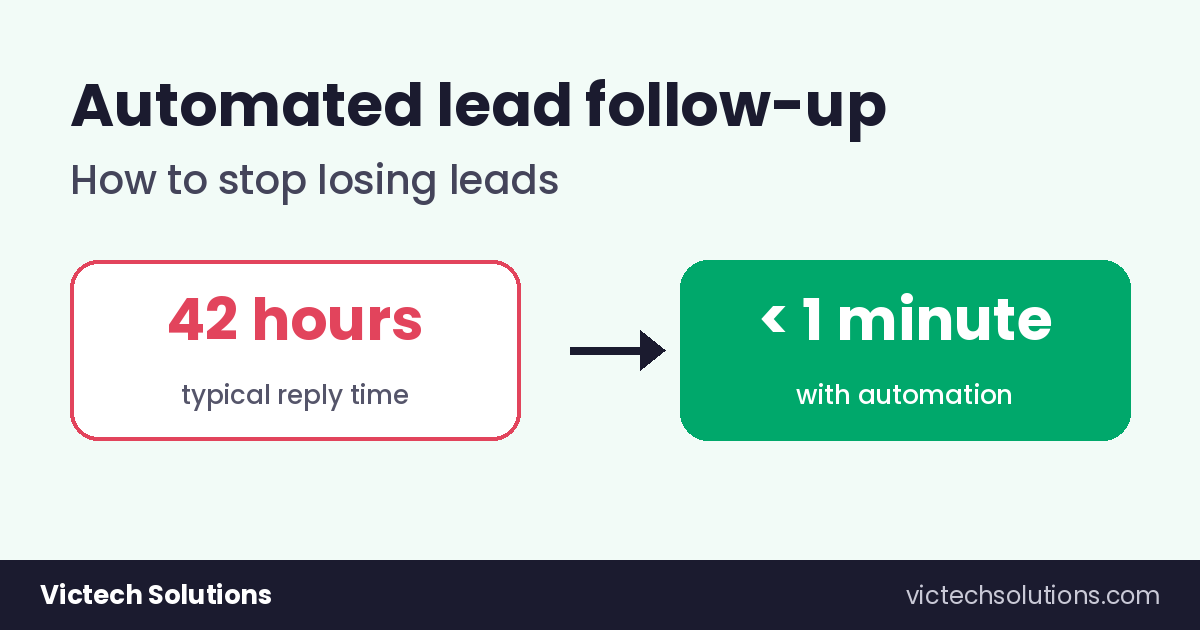
Speed matters, and most teams are slow. A 2026 benchmark of B2B inbound leads found a median response time of 42 hours, with around 35% of leads waiting more than a day for any reply (Aloware, 2026 speed-to-lead benchmark). The well-known “5-minute rule” comes from older lead response research that goes back to 2007, and the idea still holds: the first business to reply usually gets the conversation.
Slow follow-up is rarely because reps are lazy. Lead response time is really two delays added together: the time it takes to process and route the lead, plus the time the rep takes to respond (LeanData). Automation removes most of the first delay completely.
What an automated lead follow up system does
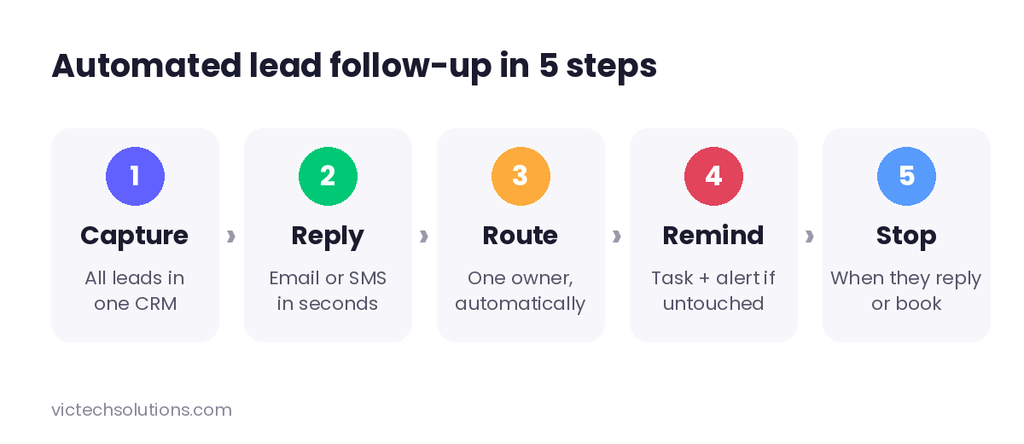
A good system does five jobs, every time, without anyone remembering to do them:
- Capture: every form, call, chat or ad lead lands in one CRM, with its source.
- Instant reply: the lead gets an email or SMS within seconds, with a booking link.
- Route: the lead is assigned to the right owner by service, location or round robin.
- Remind: the owner gets a task, and a manager is alerted if the lead is still untouched after a set time.
- Stop: the sequence stops the moment the lead replies, books or says no.
How to set up an automated lead follow up system in 5 steps
Step 1: Put every lead in one place
Connect your website forms, Facebook and Google lead ads, and phone system to one CRM. If leads live in an inbox, a spreadsheet and a phone, no automation can help.
Step 2: Send an instant reply
Reply within a minute with a short, human message: thank them, say what happens next and include a booking link. Keep it plain. It should read like a person wrote it.
Step 3: Assign an owner automatically
Use simple rules: by service, by area, or round robin across the team. Every lead should have exactly one owner within minutes.
Step 4: Create a task and a safety alert
The owner gets a task to call or reply. If the lead is still untouched after a set time (for example 2 working hours, or 48 hours at most), the manager gets an alert. This one rule catches most lost leads.
Step 5: Follow up, then stop
Send a short sequence over two weeks, mixing email, SMS and calls. Stop it the moment the lead replies or books, so nobody gets a “just checking in” after they have already said yes.
A simple follow-up schedule
| When | Channel | Message |
|---|---|---|
| Within 1 minute | Email or SMS | Thanks, here is what happens next, booking link |
| Within 2 working hours | Call | Owner calls; if no answer, leave a short voicemail |
| Day 1 | Answer the most common question for this service | |
| Day 3 | SMS | Short check-in with the booking link |
| Day 7 | A useful example, review or case study | |
| Day 14 | Polite last message: “Should I close your request?” |
Adjust the timing to your sales cycle. A plumber’s lead needs a call within minutes. A B2B software lead can wait a little longer, but not 42 hours.
How to follow up with leads without being pushy
- Give something useful in every message: an answer, a price range, an example.
- Use one clear next step, usually a booking link.
- Do not send more than one message a day.
- Make it easy to say no. A clear “no” is better than months of silence.
- Stop automatically when they reply. Nothing feels pushier than an automated nudge after you have already answered.
Building it in the tools you already use
| Tool | How the follow-up works | Best for |
|---|---|---|
| monday CRM | Forms create leads, automations assign owners and set reminders, email and activity tracking on each contact | Teams that also manage projects in monday.com |
| HubSpot | Forms, lead rotation, tasks and email sequences on paid Sales Hub plans | B2B teams with longer sales cycles |
| GoHighLevel | Missed-call text back, SMS and email workflows, booking calendars in one place | Local service businesses that live on calls and appointments |
| Make | Connects your forms, ads, CRM and messaging tools into one flow | Teams whose leads come from many tools that do not talk to each other |
Make has published a good example: a sustainable energy company built an automated lead follow up system with Make, Airtable and Pipedrive and cut lead response time from 24 hours to a couple of minutes (Make case study).
What faster follow-up is worth
Here is a simple example. Say you get 100 leads a month and your average deal is $2,000. If faster follow-up lifts your close rate from 10% to 12%, that is 2 extra deals, or $4,000 more revenue every month. Most follow-up automation costs a small fraction of that.
This is an illustration, not a promise. Plug in your own numbers.
Common mistakes
- Robotic messages. If the auto-reply sounds like a system, people ignore it.
- No owner. An automated email is not follow-up if no person ever calls.
- No stop rule. Sequences that keep going after a reply damage trust.
- Leads in too many places. Fix capture first, then automate.
- Never checking results. Track response time and booked calls every week.
Our experience
We build lead follow-up systems in monday CRM, HubSpot and GoHighLevel, and use Make to connect tools that do not talk to each other. The pattern that works best is always the same: one place for leads, an instant reply, one owner and a safety alert for anything untouched. That alone usually fixes most of the leads that were slipping through.
FAQ
How do I follow up with leads quickly?
Send an automatic reply within a minute, assign an owner straight away, and give the owner a task to call within a set time. Alert a manager if the lead is still untouched.
How many times should I follow up with a lead?
Usually 5 to 7 touches over about two weeks, across email, SMS and calls. Stop as soon as they reply or book.
How do I assign leads automatically in a CRM?
Most CRMs let you assign by rule (service, area or source) or by round robin. In monday CRM this is an automation; in HubSpot it is lead rotation or a workflow; in GoHighLevel it is a workflow action.
Can law firms automate client lead follow-up?
Yes. Law firms can send instant replies, book consultations and remind staff automatically. Keep messages general, avoid legal advice in automated texts, and follow your local rules on client communication.
What is a good lead response time?
As fast as possible, ideally within minutes. Since the typical business takes far longer, even replying within the hour puts you ahead of most competitors.
How long does a new lead wait today?
If you are not sure, that is the first thing to fix. Tell us how leads reach you today and we will map a simple follow-up system for your team. Contact us for a free review.