
If you are comparing n8n vs Make (and wondering where Zapier fits), here is the short answer. Zapier is the easiest and connects to the most apps, but it gets expensive as your volume grows. Make gives you more control for less money and suits most small teams. n8n is the cheapest at high volume and the most flexible, but it needs someone technical to set it up and look after it.
Below we compare all three on ease of use, integrations, AI, hosting and real 2026 prices. We also run the same workflow through each tool so you can see what you would actually pay.
Table of Contents
Quick verdict: n8n vs Make vs Zapier at a glance
| Feature | Zapier | Make | n8n |
|---|---|---|---|
| Best for | Non-technical teams who want it working today | Small teams who want power without code | Technical teams with high volume or strict data rules |
| Ease of use | Easiest | Medium | Hardest |
| Integrations | 8,000+ apps | 3,000+ apps | 400+ built-in, plus any API |
| How you pay | Per task (each action step) | Per credit (each module action) | Per execution (one full workflow run) |
| Free plan | 100 tasks/month | 1,000 credits/month | Free if you self-host |
| Entry paid plan | $19.99/mo, 750 tasks | $12/mo, 10,000 credits | $20/mo, 2,500 executions |
| Self-hosting | No | No | Yes |
Prices are monthly rates on annual billing, checked November 2026.
What is Zapier and who is it for?
Zapier is the best-known automation tool. You pick a trigger (“new form entry”), add one or more actions (“create a contact”, “send a Slack message”), and Zapier runs it for you. Each automation is called a Zap.
Zapier’s biggest strength is its app library. If a tool has an integration at all, it is probably on Zapier. The builder is a simple step-by-step list, so most people can build their first Zap in under an hour.
Choose Zapier if your team is not technical, your workflows are simple, and your volume is low. A few hundred runs a month fits Zapier well.
What is Make and who is it for?
Make (formerly Integromat) uses a visual canvas. Instead of a list, you build a “scenario” as a map of connected bubbles. You can see data flow from one app to the next, split it with routers, filter it and loop over lists.
That visual map makes complex workflows easier to read and fix. Make also does more per dollar than Zapier. The trade-off is a learning curve: expect a few days before you feel comfortable, not a few hours.
Choose Make if you need branching logic, data mapping between tools, or a lot of runs per month, and you still want a no-code tool your team can own.
What is n8n (and what does n8n stand for)?
n8n is short for “nodemation” (node + automation). The 8 stands for the eight letters between the two n’s. It is an open-source style workflow tool built for technical users.
n8n looks similar to Make, with nodes on a canvas, but it goes further for developers. You can write JavaScript or Python inside a workflow, call any API, and run AI agents with your own models. Most importantly, you can install n8n on your own server, so your data never leaves your systems.
Choose n8n if you have someone technical on the team, you run thousands of workflows a month, or you need to keep data in-house.
n8n vs Make vs Zapier: feature by feature
Ease of use
Zapier is the easiest. Make is in the middle: visual, but you need to understand how data moves between modules. n8n is the hardest, because connecting some apps means setting up API keys or developer accounts yourself. In our experience, a new user learns Zapier in hours, Make in days and n8n in weeks.
Integrations
Zapier connects to 8,000+ apps and Make to 3,000+. n8n has 400+ built-in integrations, fewer than the other two. Its HTTP Request node, though, can connect to almost any tool that has an API, if you know how to set it up.
Logic and data handling
Make and n8n both handle branches, loops, arrays and error routes well. Zapier has filters and paths, but complex logic gets messy and adds tasks to your bill.
AI and code
All three now offer AI steps. n8n leads for builders who want full AI agents, custom code and their own models. Make offers visual AI agents that non-developers can set up. Zapier makes AI easy to add but gives you less control.
Hosting and data control
Zapier and Make run only in their own cloud. n8n can run in its cloud or on your own server. If your industry has strict data rules (health, finance, legal), self-hosted n8n is often the only option of the three that passes review.
n8n pricing 2026 vs Make and Zapier pricing
Each tool counts usage in a different way, and that is where most of the confusion comes from:
- Zapier counts a task every time an action step runs. The trigger is free.
- Make counts a credit for every module action, including the trigger check.
- n8n counts one execution per full workflow run, however many steps it has.
| Plan | Zapier | Make | n8n |
|---|---|---|---|
| Free | 100 tasks/mo, two-step Zaps only | 1,000 credits/mo, 2 active scenarios | Community edition, free on your own server |
| Entry | Professional: $19.99/mo, 750 tasks | Core: $12/mo, 10,000 credits | Starter: $20/mo, 2,500 executions |
| Mid | Team: $69/mo, 2,000 tasks | Pro: $21/mo, 10,000 credits | Pro: $50/mo, 10,000 executions |
| Team | Included in Team (25 seats) | Teams: $38/mo, 10,000 credits | Business: about $800/mo, 40,000 executions (self-hosted) |
| Enterprise | Custom | Custom | Custom |
Annual billing, checked November 2026. All three let you buy more volume on each plan. See the official pages for current numbers: Zapier pricing, Make pricing and n8n pricing.
What the same workflow costs on each tool
Prices per plan do not tell you much on their own. Here is one real-world example: a 5-step lead workflow (new form entry, find or create the contact, add a deal, notify the owner, send a welcome email) that runs 2,000 times a month.
| Zapier | Make | n8n | |
|---|---|---|---|
| Usage per run | 4 tasks (trigger is free) | 5 credits | 1 execution |
| Usage per month | 8,000 tasks | 10,000 credits | 2,000 executions |
| Plan that fits | A higher task tier (Professional’s 750 tasks is not enough) | Core, $12/mo | Starter, $20/mo (or free self-hosted) |
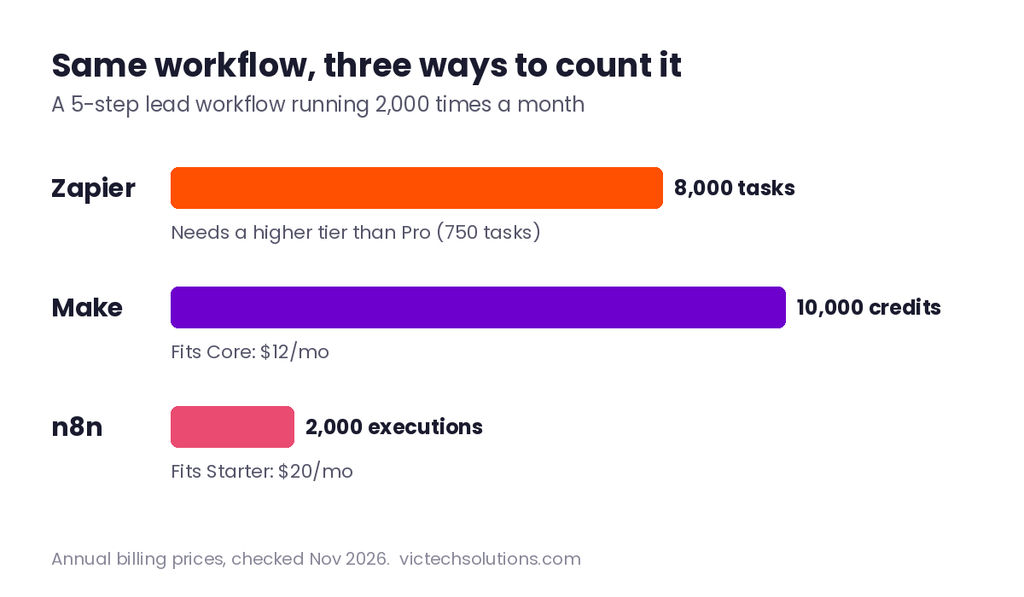
The pattern is clear. The more steps and runs you have, the more Zapier’s per-task model costs you. Make stays cheap while workflows are short. n8n stays flat because a 20-step workflow costs the same as a 2-step one.
Hidden costs most comparisons skip
- Self-hosted n8n is not really free. You pay for a server, and someone has to update it, back it up and fix it when it breaks. For a small team, that time often costs more than the cloud plan.
- Make credits add up inside loops. A scenario that loops over 50 rows uses credits for every module on every row. One busy scenario can use your whole 10,000 credits.
- Zapier overages cost more. If you go over your task limit, Zapier keeps your Zaps running with pay-per-task billing, but at a higher rate than your plan’s included tasks.
- Setup and fixes take time on every tool. A cheap tool your team cannot maintain ends up costing you more than an expensive one they can.
Which one should you choose?
- Pick Zapier if nobody on your team is technical, you run fewer than about 750 tasks a month, and you need an app that only Zapier supports.
- Pick Make if you want visual, no-code automation with real logic, and you want to keep costs low as you grow. This is the right choice for most small teams.
- Pick n8n if you have a developer (or a partner who can maintain it), run thousands of workflows a month, build AI agents, or must keep data on your own servers.
Many teams use two. A common setup is Make for everyday business workflows and n8n for heavy data or AI jobs.
Moving from Make to n8n (or Zapier to Make)
There is no reliable one-click converter between these tools, so plan to rebuild your workflows. To make it easier:
- List every active workflow, what triggers it and which apps it touches.
- Move the simplest, lowest-risk workflows first.
- Run the old and new versions side by side for a week and compare results.
- Turn off the old workflow only when the new one has run cleanly.
Our experience
Most of the automations we build for clients run on Make, usually connected to a CRM or a monday.com workspace. For LoveWill, we used Make to connect monday.com with the other tools the team relied on, so updates moved between systems without anyone copying data by hand.
What we see again and again: teams pick a tool on price alone, then get stuck because nobody can maintain it. Pick the tool your team can own. If you are unsure, start with Make, then move heavy workloads to n8n later.
FAQ
What is the difference between n8n and Make?
Both are visual workflow builders. Make is a no-code cloud tool that charges per module action. n8n is built for technical users, charges per full workflow run, lets you write code and can be self-hosted.
Is n8n better than Make?
For technical teams with high volume, AI work or strict data rules, yes. For non-technical teams who want quick results, Make is usually the better choice.
Is n8n cheaper than Zapier?
Usually, yes. n8n charges once per workflow run, while Zapier charges for every action step. The more steps and runs you have, the bigger the difference.
Can I use n8n for free?
Yes. The Community edition is free if you install it on your own server. You still pay for the server and the time to maintain it. n8n Cloud is paid, with a free trial.
Does Make offer self-hosting?
No. Make runs only in its own cloud. If you need self-hosting, n8n is the option among these three.
How much is n8n Enterprise?
n8n Enterprise has custom pricing. You need to contact n8n’s sales team for a quote.
Is n8n a good Zapier alternative?
Yes, if you have technical skills or a partner who does. You get lower costs at volume and far more control. If you need something non-technical, Make is the easier Zapier alternative.
Need help choosing or building your automations?
We design and build automations in Make, n8n and Zapier, connected to your CRM and project tools. Tell us what you want to automate and we will tell you which tool fits, honestly. Contact us for a free review.